 ClerkBrain
Receipts and invoices, read privately — never uploaded
Cloud receipt scanners ask you to send your financial documents to a server you don't control. ClerkBrain reads them, extracts the supplier, date and total, and double-checks anything unclear — entirely on your own PC.
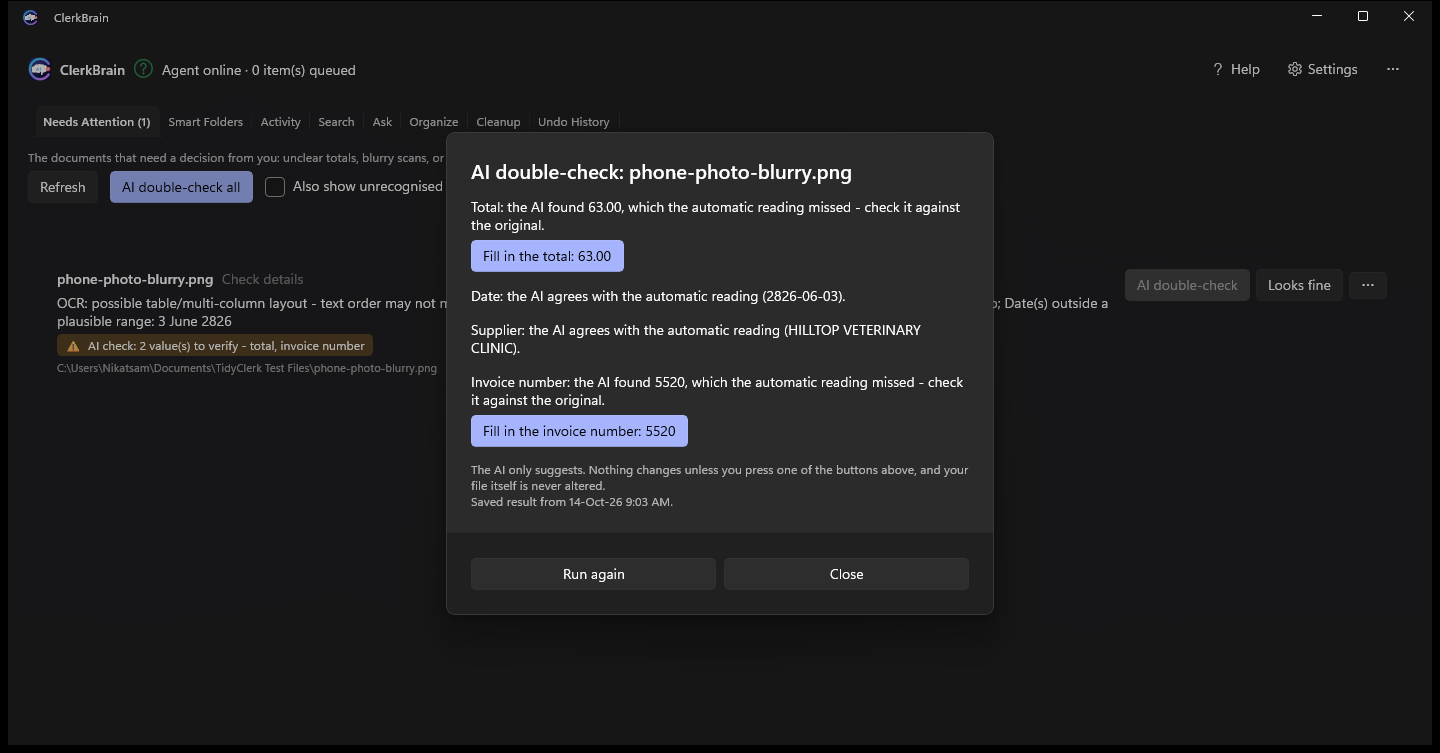
When a scan is unclear, it tells you — it doesn't guess
A blurry photo of a receipt or a faded thermal-paper printout can confuse a rules-based reader. ClerkBrain's on-device AI re-reads the document and compares its own answer against the extracted value. If they disagree, or the AI isn't confident, the document is flagged in Needs Attention instead of silently filing a wrong total.
Scans and phone photos, not just PDFs
Built-in optical character recognition reads printed receipts, scans and photographed documents, so a crumpled paper receipt is read the same way as a clean digital invoice.
One-click accountant pack
Gather every receipt and invoice from a tax year into a single export with extracted totals and dates — built for freelancers and small businesses, not just hoarders of PDFs.
No cloud, ever
No account, no server-side processing, no analytics. The only network call ClerkBrain ever makes is the optional, one-time, checksum-verified AI model download.
Common questions
Is it safe to scan receipts and invoices with AI software?
With ClerkBrain, yes, because nothing is uploaded: the text extraction, OCR and AI double-check all run locally on your own PC. Cloud-based receipt scanners typically send your documents to a server; ClerkBrain never does.
Can I export my receipts and invoices for my accountant or tax return?
Yes. ClerkBrain can gather every receipt and invoice from a given date range into a single export, alongside the extracted totals and dates, without any of the files ever leaving your PC during the process.
Does ClerkBrain read blurry or photographed receipts, not just PDFs?
Yes. Built-in text recognition (OCR) reads scans and phone photos, and when a document is too unclear to read confidently, it's flagged in Needs Attention with an AI double-check rather than silently guessing at a wrong total.
Try it on your own receipts and invoices
Free on the Microsoft Store.
⊞ Coming soon to the Microsoft Store