 ClerkBrain
Ask your documents a question. Get a sourced answer.
"How much was my last electricity bill?" "Which invoices did I get from Acme this year?" Type the question in plain English — the on-device AI searches by meaning, not just matching words, and shows you exactly which document the answer came from.
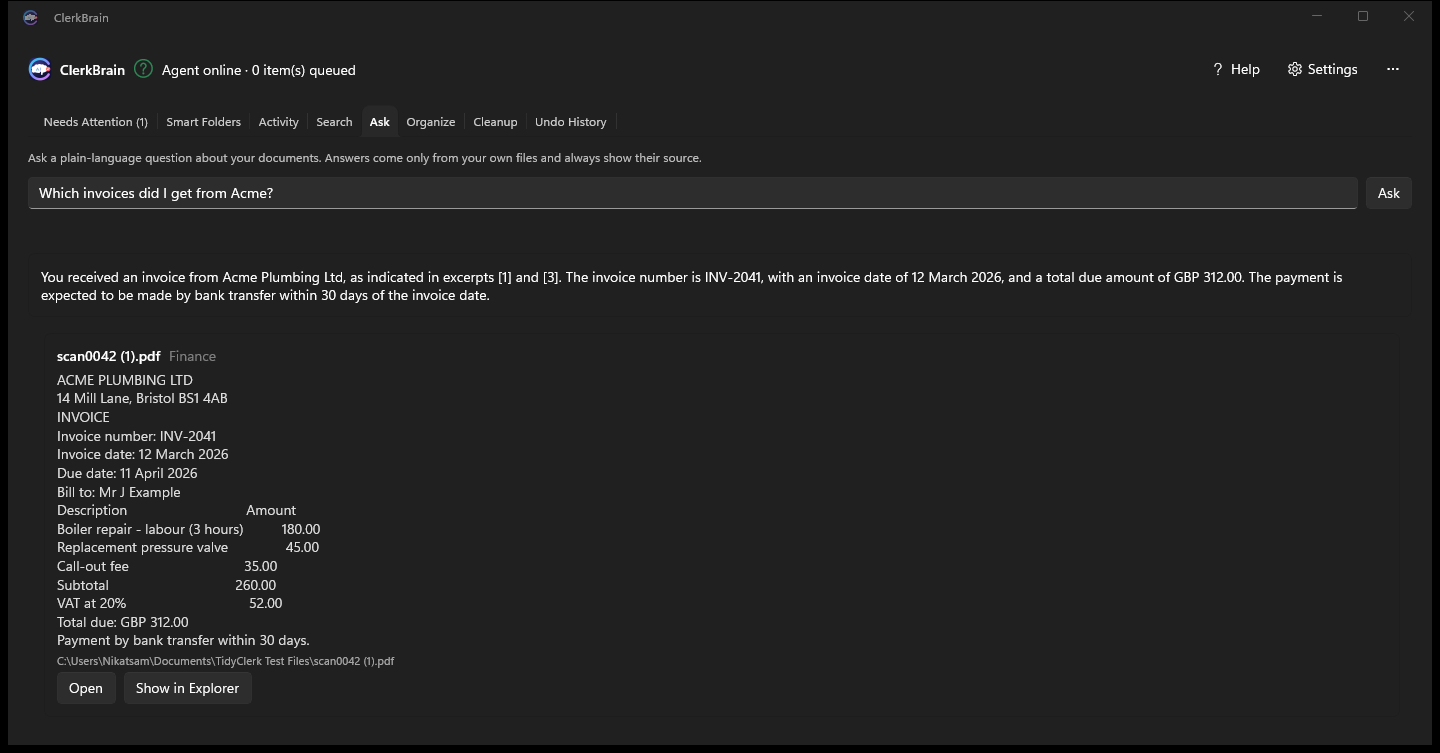
A private AI that only knows what's in your own files
The model doesn't guess from general knowledge — it answers from the text it has actually read in your documents, and always cites the file it used. If the answer isn't in your documents, it says so rather than making one up.
Search by meaning
Finds the right document even when your wording doesn't match the file's wording exactly — "power bill" finds an "electricity invoice."
Always shows its source
Every answer is paired with the document it was drawn from, so you can open and check it yourself in one click.
Works fully offline
Once the small local models are downloaded, Ask works with no internet connection — nothing is ever sent to a cloud AI service.
Common questions
Is there an offline AI that can search my documents without uploading them?
Yes. ClerkBrain's Ask tab runs a small language model directly on your PC. Once you've downloaded the optional AI models, you can ask questions with no internet connection at all, and nothing is ever sent off your device.
How accurate are the answers, and can I trust them?
Every answer shows the exact source document it came from, so you can check it yourself. The model answers only from the text of your own documents — it does not invent facts from general knowledge.
What AI models does ClerkBrain use locally?
A small embedding model (around 90 MB) for meaning-based search, and a small language model (around 2.7 GB) for answering questions, both downloaded once, verified against a SHA-256 checksum, and run entirely on your own processor.
Try asking your own documents a question
Free on the Microsoft Store.
⊞ Coming soon to the Microsoft Store